
Variable and survey naming conventions
Poor variable naming causes avoidable errors in analysis. Decisions made before coding starts determine how much pain comes later.
Practical naming conventions for survey variables and project files - covering length constraints, character sets, prefix schemes, and project file naming to prevent downstream errors.
Knowledge Base -> Survey Building -> Methods & Academic
Ben White, 09.07.2026
Why naming matters before you start coding
Survey data travels far from its origin. Variables end up in SPSS, Stata, R, CSV exports, folder names, email attachments, and analyst scripts. Each of these environments has its own constraints - SPSS and Stata have a 32-character variable name limit; some tools reject spaces, special characters, or names starting with numbers.
Inconsistencies introduced at the naming stage compound downstream. A variable named 'Gender' in one wave and 'gender_q1' in the next requires manual reconciliation before analysis can begin. Variables named without a type prefix - 's1' for a screening question vs 'q1' for a main question - are ambiguous when the data file is opened months later by someone who did not build the survey.
The cost of fixing naming problems after fieldwork
Renaming variables after data collection requires updating every reference in every analysis script. If the data has been shared with a client or co-investigator, you have introduced a version control problem. Fixing naming before coding starts costs minutes; fixing it after fieldwork costs hours.
Survey project naming matters too. The survey link distributed to respondents or panel providers contains the project name. Renaming the project after links have been distributed requires recontacting everyone who received the original link.
Naming conventions that work
The table on the right shows how some innocuous variants of the variable gender are accepted by the most popular analysis tools. Many also have a modest maximum size with SPSS and STATA having a 32 character limit.
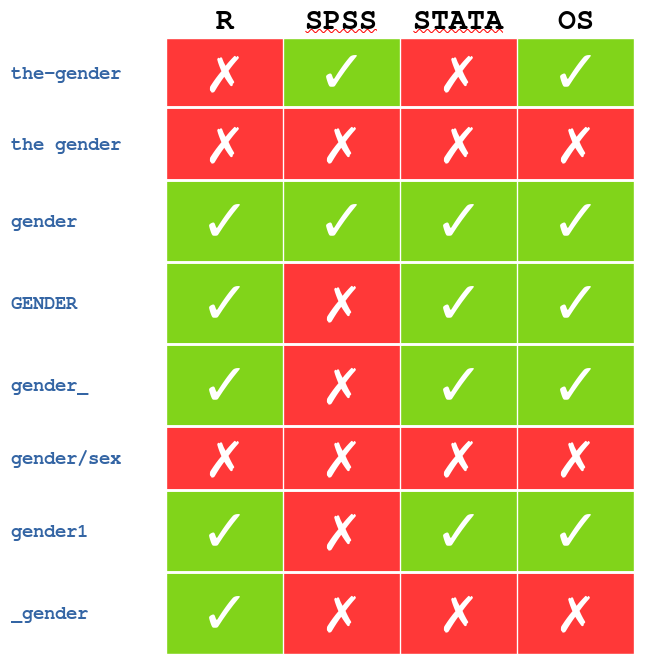
Variable names: use only lowercase ASCII characters (a-z), numbers, and underscores. No spaces, no special characters, no names starting with a number. Keep names under 16 characters - shorter if you plan to append suffixes like '_male' or '_female'. A name that is 14 characters plus a 6-character suffix exceeds the SPSS limit.
Use a type prefix to distinguish question categories. A common scheme: 's' prefix for screening questions (s1, s2, s3), 'd' prefix for demographics (d1, d2), 'q' prefix for main survey questions (q1, q2, q3). This makes the variable list self-documenting.
Project file naming: use a stable base name for the live project that never changes. Append '_bak' and a version number for backups (project_bak1, project_bak2). Append '_sim' for simulation copies. The live project name appears in respondent-facing URLs - once distributed it is expensive to change.
Maintain a data dictionary. Variable names following the conservative rules above will be cryptic without one. A simple spreadsheet with variable name, question text, response options, and notes is sufficient. It takes 30 minutes to build and saves hours in analysis.
A naming scheme for a health preference study
A DCE on treatment preferences for a rare oncology indication uses the following scheme: screening questions s1-s6 (diagnosis, treatment history, age, country, language, consent), demographic questions d1-d4 (gender, education, employment, income), and main survey questions q1-q12 (health state descriptions, choice tasks, willingness to pay items).
The live project is named 'nmcrpc_live'. Backups are 'nmcrpc_bak1' through 'nmcrpc_bak4'. Simulation copies are 'nmcrpc_sim1' and 'nmcrpc_sim2'. The data dictionary is maintained in a shared spreadsheet and updated every time a variable is added or renamed.
References
Contact SurveyEngine to discuss your survey design requirements.
Or Contact us at support@surveyengine.com — we're glad to help.